Exporting to engines
Each engine has different import options. You can import directly into an open game engine project, create a package that you can import later, or use a temporary project.
UEFN
When you import a single baked asset or select an asset from Recently Baked, AutoVAT shows this interface.
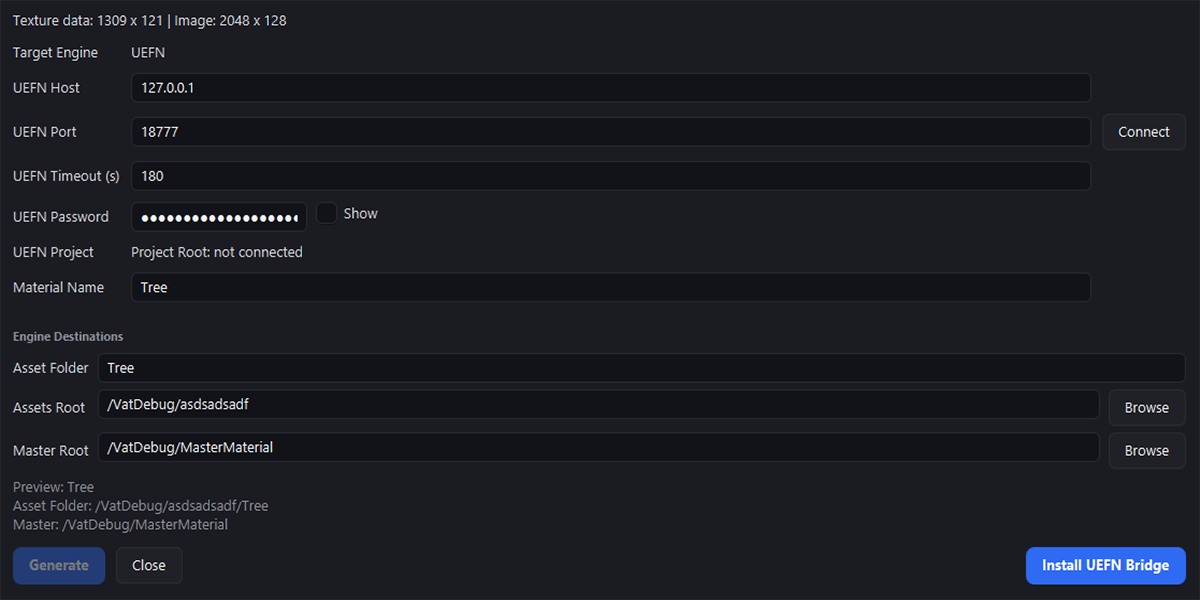
The UEFN import window contains the connection and destination settings for the import. UEFN Host specifies the local address of the UEFN bridge and uses 127.0.0.1. UEFN Port specifies the local port that AutoVAT uses to communicate with the bridge. UEFN Timeout (s) specifies how long AutoVAT waits for a response before the connection times out. UEFN Password is a randomly generated key that prevents other local processes from accidentally communicating with the running bridge script. Select Connect to connect AutoVAT to the open UEFN project.
If the AutoVAT bridge is not installed, select Install UEFN Bridge. Select the location of your UEFN project, and AutoVAT installs the required bridge script. Before you install the bridge, enable Editor Python Scripting in UEFN for the project.
You only have to install the bridge once for each project. After you enable Editor Python Scripting or install the bridge, close and reopen the UEFN project for the changes to take effect.